
Practice schedule
Who does which round, on one shared schedule
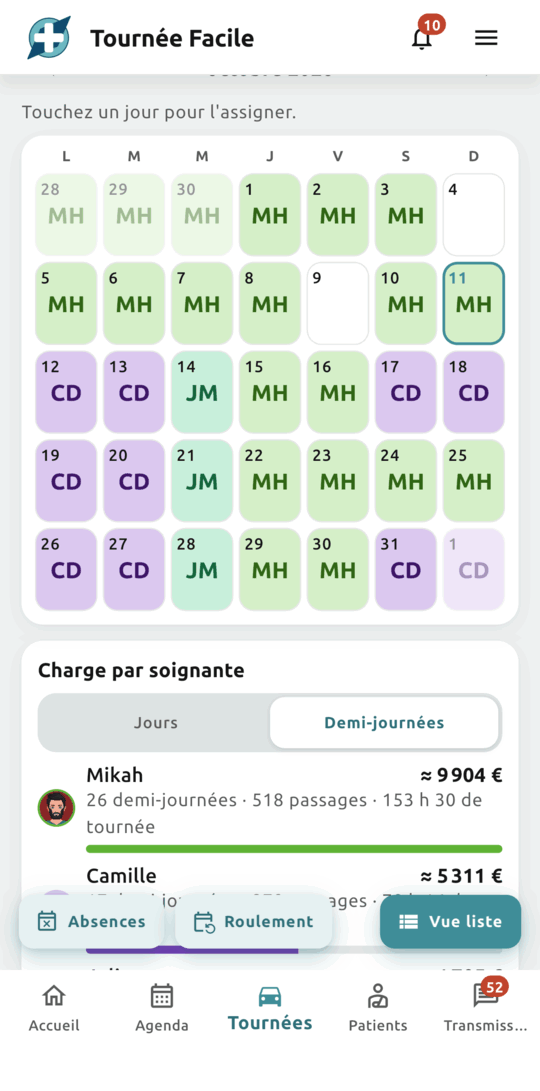
The practice's rounds by day, week or month, in each nurse's colour. Holidays, a substitute, a rotation: the whole practice sees the same schedule, up to date.


Without Tournée Facile
- A paper rota photographed into the practice's group chat.
- “Who's on tomorrow morning?”, at 9 pm the night before.
- The substitute who discovers their round on arrival.
With Tournée Facile
- Click a slot to assign the round, the half-day or the whole day.
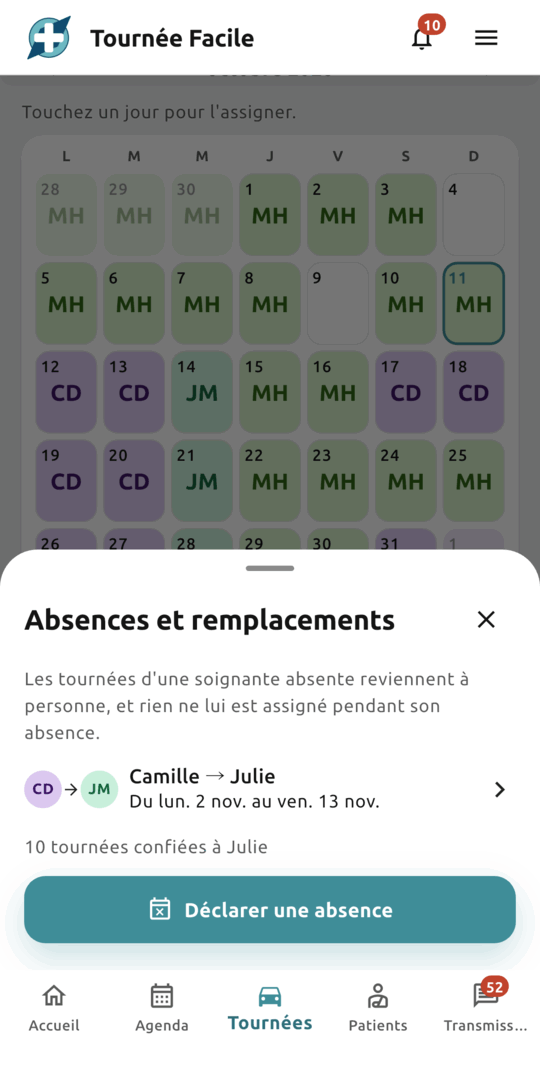
- Declare your holidays: your rounds go to your substitute, and come back to you if you remove the absence.
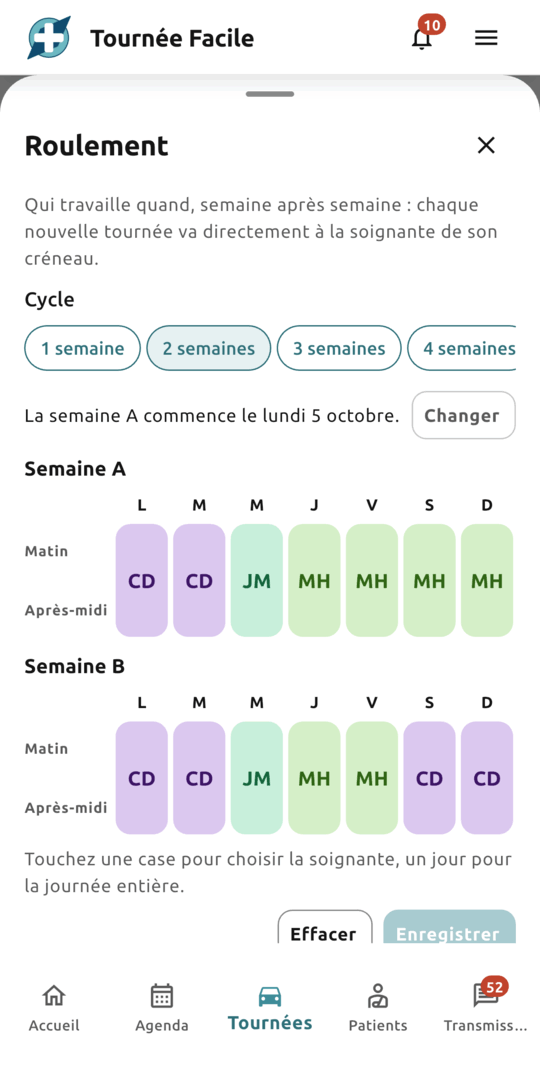
- Set a rotation of one to four weeks: the schedule fills up, and new rounds follow it by themselves.
What it actually changes
Day, week, month
Read the day hour by hour, the week by half-days, the month by days. Each nurse has a colour and a photo, carried into the calendar and the rounds: you see at a glance who works when.
Holidays and substitutes
Declare holidays ahead: from … to …, or open-ended, with a substitute or “Replacement needed”. Their rounds go to the substitute straight away (“10 tours handed to Julie”) and come back to their nurse if you remove the absence. You have no reason to give: it has no place on a schedule.
A rotation over one to four weeks
Week A, week B…: set who works each morning, each afternoon or the whole day, over a cycle of one to four weeks starting on the Monday of your choice. Save it: the schedule fills up straight away on every day ahead, holidays and substitutes included. If you have handed rounds out by hand, click “Apply” to go back to the rotation over the period.
Everyone's workload
Follow each nurse's days and half-days over the period and, if you are an owner or associate, the projected revenue, as an estimate. Print the schedule: it shows no patient name.
How it works
Open the schedule
From the rounds screen, click “Planning” and choose the day, the week or the month. Click “Only me” to see yours alone.
Assign, or set your typical week
Click a slot to give the round to a nurse. Or set the practice's rotation: the weeks ahead follow it by themselves.
Declare holidays
Holidays, training, the unexpected: enter the nurse, the substitute and the dates, and the schedule updates for the whole practice.
The step-by-step how-to: Rotation and absences: organising the practice schedule
Your schedule stays in your practice
The schedule, absences and rotation are visible to the practice's members only, and hosted in France by a certified health data host. An absence carries no reason, by design, and the printed schedule shows no patient name.
Frequently asked questions
Yes: the Day and Week views, the current month, the month's absences and a one-week rotation followed over the next four weeks. The months ahead, two- to four-week rotations, printing and projected revenue are part of Pro.
Once invited to the practice, they find the rounds assigned to them on their home screen and in the schedule, with “Only me” to show theirs alone. The 6 pm summary tells them how many rounds were assigned to them.
Yes: a saved rotation gives every new round to the nurse of its slot, or to their substitute if they are on holiday. A round already under way never changes hands.
Also worth a look
Shared calendar
Plan, frame and adjust the practice's appointments; the whole team works on the same version.
Learn morePractice & substitutes
Shared patients and rounds, roles that match the job, and a substitute up and running the moment they log in.
Learn moreOptimized rounds
The order of visits calculated automatically in seconds, and a round you work through stop after stop, without forgetting anything.
Learn moreWant to try Tournée Facile?
The app is live: create your free account on the web, or download it from the App Store or Google Play.
Available in France for now — the rest of Europe is coming soon.