
Practice & substitutes
A practice that keeps running, even when you're away
Several of you working on the same patients and the same rounds — and a substitute who starts without you handing over a folder the night before.


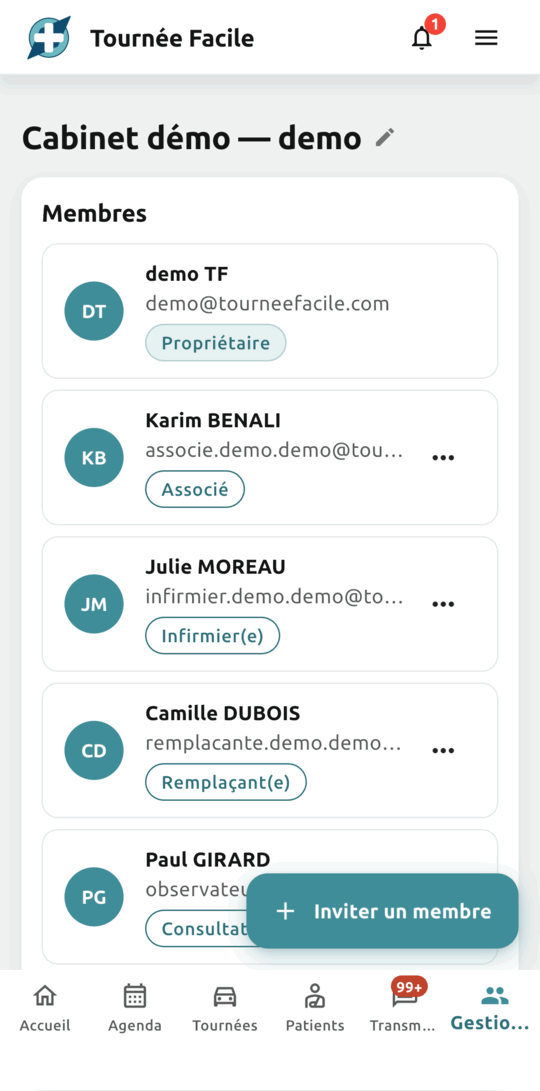
Without Tournée Facile
- A handover done on the phone the night before, hoping nothing is forgotten.
- Patient files passed around on personal messaging apps.
- No way to limit what a one-off stand-in can see.
With Tournée Facile
- The substitute logs in and finds the rounds, the records and the latest handovers, up to date.
- Everyone has a role, and therefore exactly the rights their job requires.
- You stay in control: add, adjust or withdraw access whenever you want.
What it actually changes
Roles that match the job
Owner, associate, nurse, substitute, assistant or plain viewer: each one gets the rights of their role, with no settings to fiddle with. And each nurse has their own colour and photo, used in the calendar, the schedule and the rounds.
A substitute who starts straight away
They take over today's round with the records, the instructions and the latest handovers. Declare your absence in the practice schedule: your rounds are reassigned to them automatically. You no longer have to narrate it all over the phone.
Your practice is a sealed space
Your data is out of reach of every other practice. That separation is retested automatically with each new version: it is the first thing we check.
Never a practice without an owner
The app refuses to remove the last owner. Someone can always manage access, even on the day of an abrupt departure.
How it works
Create your practice
Your patients and your rounds belong to it, and you are its owner.
Invite your colleagues
Each invitation sets the role, and therefore what the person will see and do.
Adjust when things change
A locum ending? Change their role or cut their access in a few clicks.
The step-by-step how-to: Rotation and absences: organising the practice schedule
Everyone sees what they should see
To see a practice's data you have to be a member of it, and that is checked on our servers every single time. It is not a hidden display that could be worked around.
Frequently asked questions
As many as your practice has. Every member gets their own account and their own role.
Yes. Add them for the duration of the replacement with the locum role, then revoke their access once it's over.
No. The separation is enforced on our servers: data that isn't yours is simply not findable, not merely hidden.
Also worth a look
Practice schedule
Who does which round, day after day: absences, substitutes and rotation included, in each nurse's colour.
Learn moreShared calendar
Plan, frame and adjust the practice's appointments; the whole team works on the same version.
Learn moreHandovers
Text, voice note or photo: the handover joins the patient's record, your colleagues see it within the second and you know who has read it.
Learn moreWant to try Tournée Facile?
The app is live: create your free account on the web, or download it from the App Store or Google Play.
Available in France for now — the rest of Europe is coming soon.