
Practical guide
How to plan a nursing round, step by step
You are looking for a tool to plan your round. You are in the right place: this guide shows, screen by screen, how you go from a round you hold in your head to a round that works itself out — and what that changes about your day.
You leave at 6 am. Twelve patients, three bed baths, two complex dressings, a fasting blood draw that has to happen before 8, and Mrs D. who won’t see anyone before 9. The order you visit them in is not an administrative detail: it is twenty minutes of driving more or less, every single day.
Most community nurses plan that round in their head, or on a notepad. It works — until the locum, until the patient added the evening before, or until the day someone else has to be told the whole order.
Tournée facile does that work for you. Your patients, their times, their care: the visiting order is computed, the arrival times appear, and you know before you leave what time you will be back. The rest of the practice follows — the shared diary, the patient records, the team’s handover notes, the recap of your visits at the end of the month. One tool, on your phone as much as on your computer.
Around ten minutes to read. By the end you will know how to build your first round, have it optimised, correct it by hand when you know more than the calculation does, and run it the next morning.
What a planning tool actually does
There is a common misconception: that round software “puts the patients in the right order”. It does — but that is the last step, and the easy one. The real work happens before:
- knowing who has to be seen, on which day, at what time;
- knowing how long each visit takes;
- knowing which constraints are negotiable and which are not.
A tool that ignores those three will hand you an elegant, unusable route. One that takes them seriously hands you a visiting order you can follow without thinking about it.
Tournée facile is not just a route calculator. It is an integrated solution: it optimises the order of your patient visits and saves you time, because the diary, the patient record, their care, their handover notes and the round form a single chain in it. You book an appointment and it carries the patient and the care to be given; the patient carries their address, their history and their observations; the round collects them, and the route follows from that. Nothing to re-type from one screen to the next, nothing to reconcile at the end of the day.
A round is a window of time
This is the part that surprises people at first, and the one everything else follows from: you do not build a list of patients, you declare when you work.
An ordinary day is often two rounds: “Morning round, 6 am – 12 pm” and “Afternoon round, 1:30 pm – 4 pm”. You create them once. Each then collects every appointment in the diary that falls inside its window.
Three consequences, and this is where the time is won:
- you never enter the same thing twice — Mrs D.’s daily visit exists once in the diary, and appears by itself in every round that covers her time;
- a moved appointment follows on its own — push it from 7 am to 2 pm and it leaves the morning round and joins the afternoon one, without you having to think about it;
- two rounds on the same day don’t collide — they are two windows, not two lists to keep in step by hand.
The screenshots in this guide come from Tournée facile, on a demonstration practice whose patients are fictional. They are in French, as the app is — the captions say what you are looking at.
Your patients: who, and where
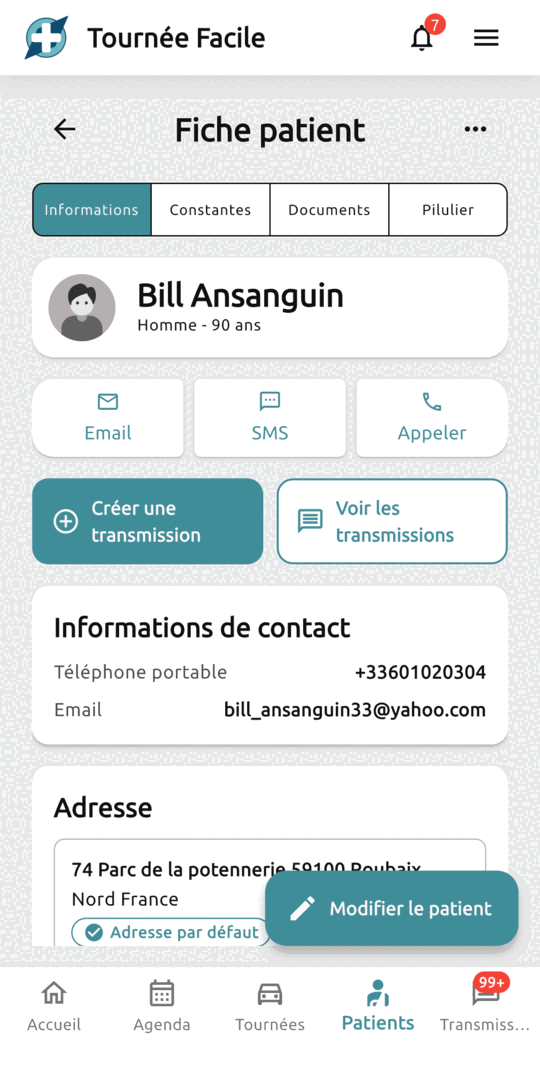
Everything starts here. Each patient has a record: their identity, their contact details, their next of kin, and their address.
The address is used twice: to work out the drive the evening before, and to take you there on the day. It is the one piece of information whose accuracy changes the result — the rest can be filled in as you go.
The record also gathers what you will want at hand on the doorstep: observations, documents, the pill organiser, and the handover notes about them — yours and your colleagues’, in the order they were written.
The appointments: when, and how long
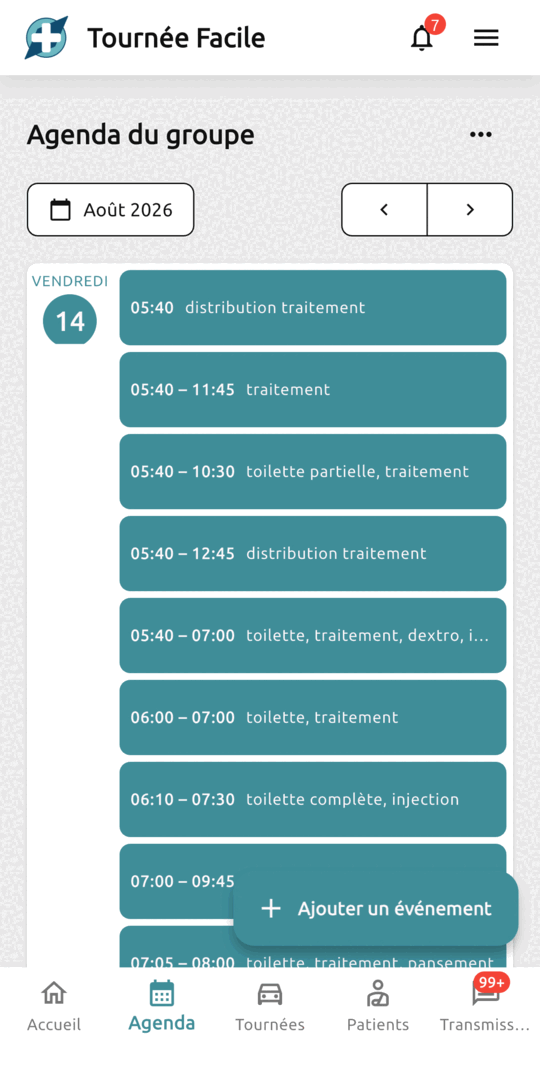
The diary is shared by the whole practice: everyone sees what the others have booked. It is what the rounds read from.
An appointment answers two questions: when can this care be given, and how long will you stay. Those are two different answers, and Tournée facile keeps them apart.
- The visiting window. When the care can properly be given, as you have assessed it: rapid insulin goes with the meal, a bed bath belongs in the morning, a treatment is given at regular intervals. “Any time between 6:10 and 7:30 am” means that anywhere in that interval, the care is given in the right conditions. It is the common case, and it is what gives the calculation something to work with.
- The fixed slot. This one comes from the patient, not from the care. Mr B. gets up at 8 and leaves for work at 9: you come at 8:30, thirty minutes, and he leaves on time. A fasting blood draw before the lab collects is the same thing. It happens — but it stays the exception, case by case.
For daily care, book a recurring appointment rather than twelve identical ones. One line in the diary, and one thing to change on the day the time moves.
The appointment finally carries two things that must not be confused: the procedures to perform, which will feed your end-of-month recap, and the time you actually spend with that patient. The coding does not tell you the duration: the same procedure takes ten minutes at one home and twenty-five at another, depending on the flat, the patient’s independence, the stairs with no lift. It is that second figure, and only that one, that Tournée facile uses to know when you leave — and therefore when you reach the next patient.
Creating the round
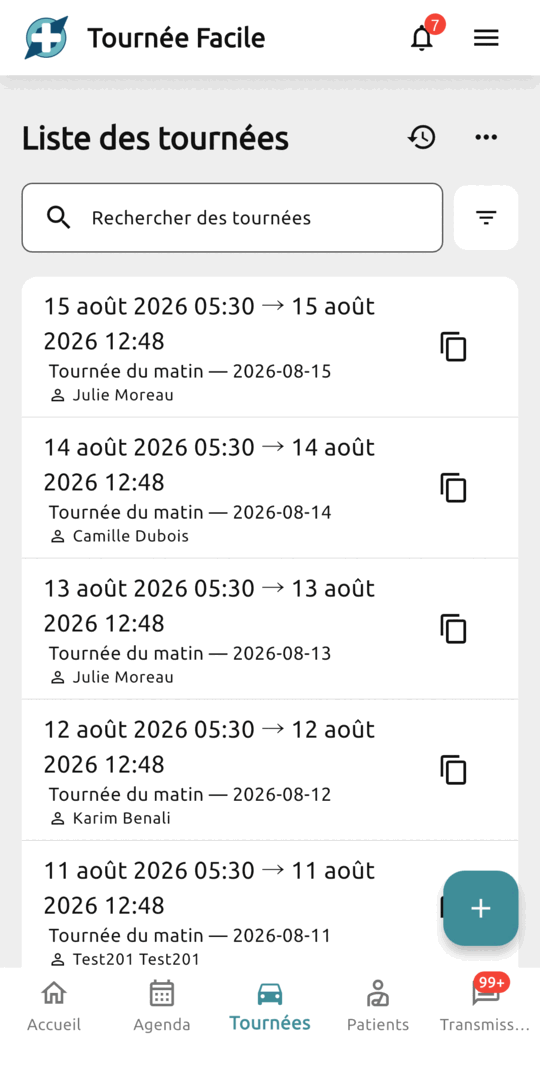
A round takes four pieces of information:
- a label — “Morning round”, “North sector”;
- a start and an end — the window: every appointment in the diary that falls inside it is collected;
- a start address and an end address — whichever you like, and not necessarily the same one;
- the nurse who will drive it — you, a partner, a locum.
The start and the finish are yours, not the practice’s. Leaving from home? Put your home address. Need to stop at the pharmacy or run an errand before the first patient? Start from there. Finishing at the children’s school rather than at the practice? That is your end address. The two are independent, and nothing stops you changing them from one round to the next.
This is not a form detail: it is the point the calculation starts from, and the one it has to bring you back to. A practice address entered “to look tidy” when you actually leave from home shifts every time shown for the rest of the day. You describe your real constraints, and Tournée facile organises itself around them.
Confirm, and the round is already populated: every appointment in the window, in chronological order. No route yet — just the list.
Optimising the visiting order
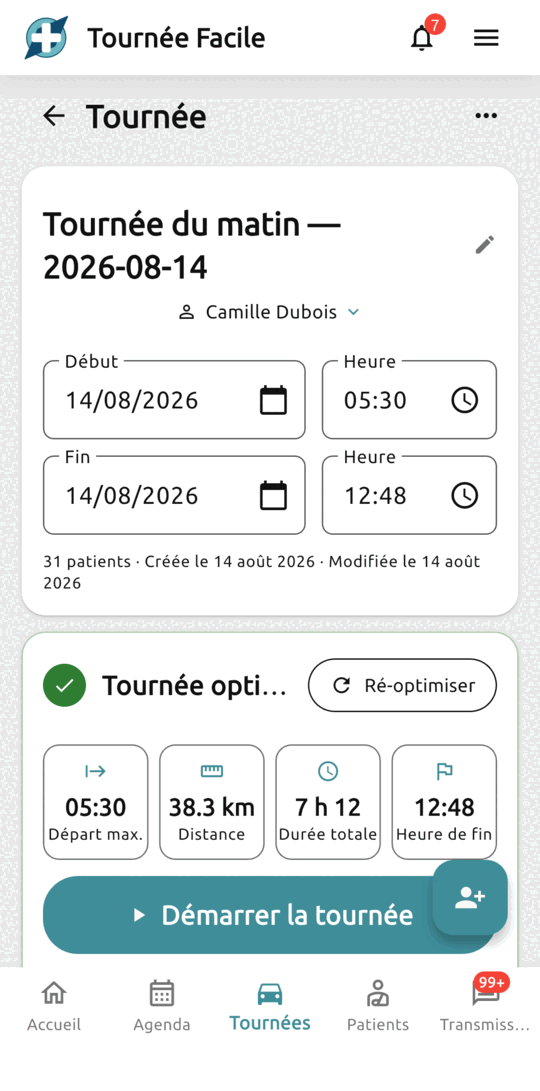
One button, and that is it. Behind it, our time-constrained route planning algorithms take over: every address is located, real driving times are computed road by road, then the visiting order is optimised — the shortest one possible, without ever breaking a fixed slot, a visiting window, the time you spend with a patient, or the round’s own window.
That word — “constrained” — is what separates Tournée facile from a plain route calculator. A satnav gives you the shortest path between points. Tournée facile looks for the shortest one that remains workable, timings included.
What you get:
- the visiting order, numbered;
- an estimated arrival time for each patient;
- the distance and the total duration;
- the latest possible departure — the last moment you can leave and still hold the schedule. Often the single most useful figure on the screen;
- the route drawn on the map.
In the example alongside: 31 patients, 38.3 km, 7 h 12 of round, and a departure no later than 5:30 am to finish at 12:48.
Reading the result
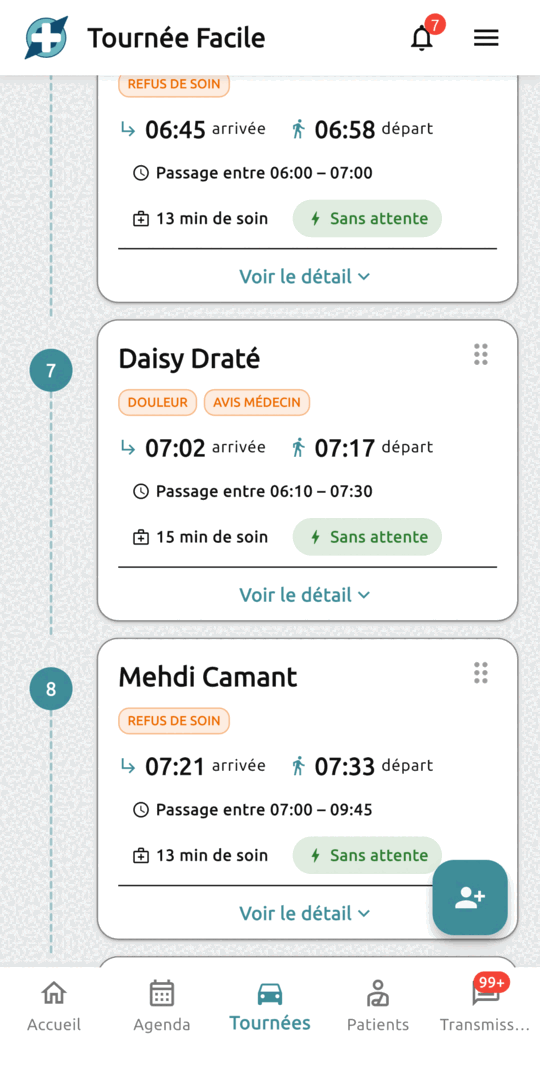
Each visit becomes a card, numbered in the order you will drive. It carries the estimated arrival and departure times, the window agreed with the patient, the length of the visit, and a small coloured label that sums up the situation.
Three labels to know:
- “Sans attente” — no waiting (green). You go straight on. This is the normal case, and the one on most visits of a well-tuned round.
- “4min d’attente” — 4 min waiting (orange). You arrive before the window opens and you wait. Not an error: the price of a constraint. If the waiting repeats and runs into tens of minutes, the window is too narrow.
- “Retard de 15min” — 15 min late (orange). The arrival falls after the end of the agreed window. This one only appears when the problem is real: on a round that holds its schedule you will never see it. When it does appear, act — widen the window, move the appointment, or accept it and call ahead.
A visit the calculation could not place moves to the top of the list, in an “À replacer” (to be placed) group, with its reason. Most often it is simply a missing usable address on the patient’s record: you complete it, you run the calculation again, and the visit takes its place in the route.
The detail behind a visit
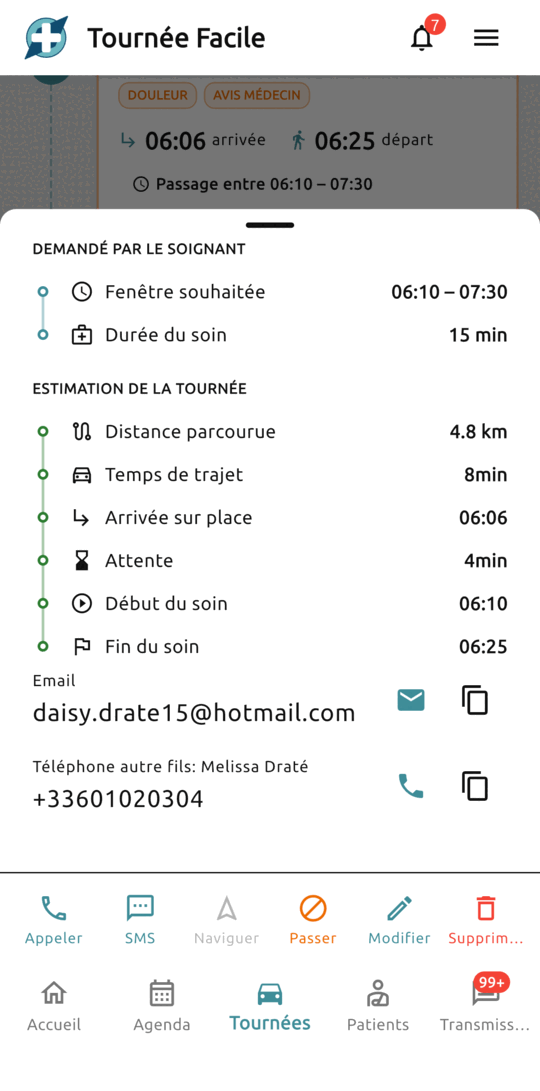
At the bottom of each visit, “Voir le détail” (see the detail) opens the whole reasoning. It comes in two blocks: requested by the caregiver — the window you asked for and the time you planned on site — then the round’s estimate, which is what the calculation makes of it.
In this example: 4.8 km from the previous patient, 8 minutes of driving, arrival at 6:06. The window only opens at 6:10, so there are 4 minutes of waiting; the care therefore starts at 6:10 and ends at 6:25, fifteen minutes later.
Rearranging by hand
The calculation finds the best order possible given what you told it. But you always know more than it does:
- Mr R. goes to dialysis on Tuesdays and the ambulance collects him at 8:30 — you have to have been already;
- Mrs T.’s bed bath happens after the care assistant’s visit, and she arrives around 8;
- Mrs D.’s dressing needs a good twenty quiet minutes: you would rather keep it for the end of the round, when nobody else is waiting for you.
None of that is written down in any software. So every card carries a handle on its right: you grab it, drag the visit where you want it, and let go.
Every time is recomputed immediately on the new order: the drives between the patients concerned, the arrival times of everyone who follows, the finish time of the round. Tournée facile does not merely reorder a list — it redoes the calculation.
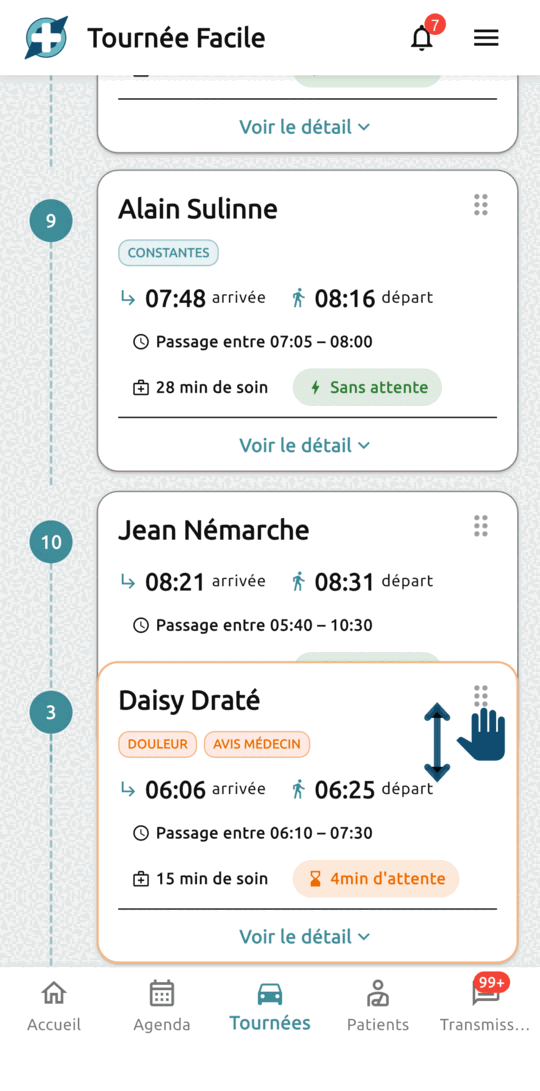
Three things worth knowing:
- An impossible order is refused, with the reason — a 6 am fixed slot dropped at the end of the morning, say. Tournée facile would rather tell you than compute a fictional schedule.
- A visit from the “to be placed” group drops into the route the same way, as long as it has an address. It is the quickest way to slot in a patient added the day before without recomputing everything.
- Nothing is final. “Revert to the state before optimisation” restores the previous order and times: every calculation and every move leaves a trace.
Adding a visit at the last minute
It is 4 pm and tomorrow’s round is already settled. The surgical ward calls: Mrs G., 82, is coming home tomorrow morning after three weeks in hospital for a hip fracture. Home with a daily dressing on the scar, an anticoagulant injection, and weight-bearing to keep an eye on. Her daughter will be there in the morning, not in the afternoon.
You know what comes next: back to the notepad, work out where Mrs G. lives relative to the others, guess whether she fits before the 9 am bed bath, and redo the order in your head. That is exactly what Tournée facile spares you, and there are two routes depending on your situation.
- Mrs G. is already your patient. Her appointments exist; you had simply marked them “not to be done” while she was away. You reopen them, adjust the time and the care to what is coming home from hospital — and she takes her place again. Nothing to re-enter: her address, her history and her handover notes never moved.
- She is a new patient. You create her record and her appointment, either from the diary or from the round — same path, and it takes two minutes.
Either way, the visit joins by itself every upcoming round whose window covers it, flagged as new. There is nothing for you to go and fetch.
Running the round on the day
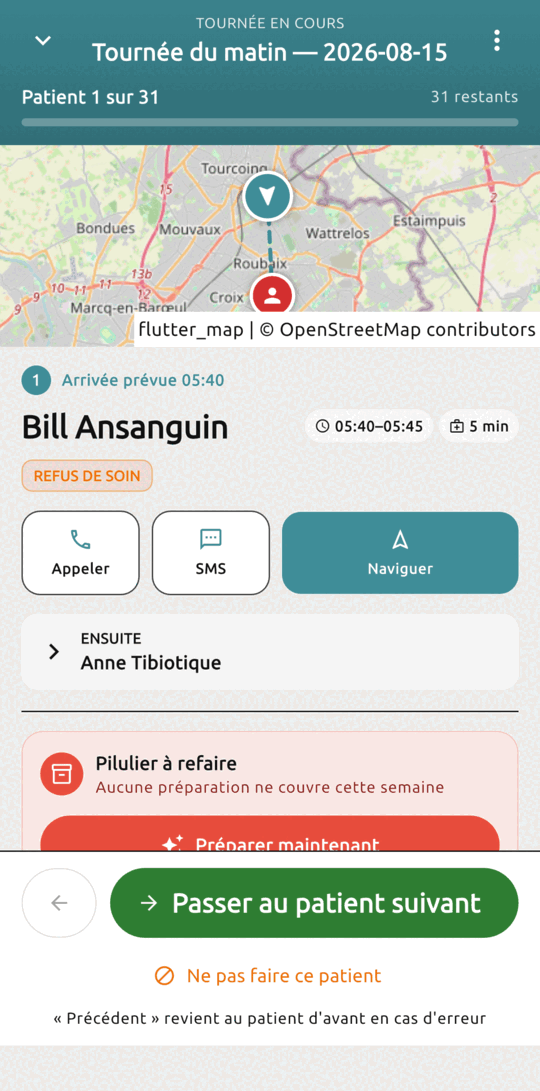
Everything so far happened the evening before, calmly. On the day you start the round and the screen changes: no more list, one patient at a time, full screen.
For each one: the route to their door, their record, their observations, the team’s latest handover notes, and a way to reach them. At the top, your progress — “Patient 1 of 31”.
Same for the drive: “Naviguer” — navigate — opens your navigation app with the address already filled in: on Android the one you actually use, Waze, Google Maps or another; on iPhone, Apple Maps. You never type an address at the wheel.
Two decisions per stop:
- Move on to the next patient — the visit is done;
- Skip this patient — away, admitted, postponed. They stay visible in the round but are never counted as visited.
Those decisions survive a re-optimisation: you can recompute your route mid-morning without losing track of what has been done.
Handing over to the team
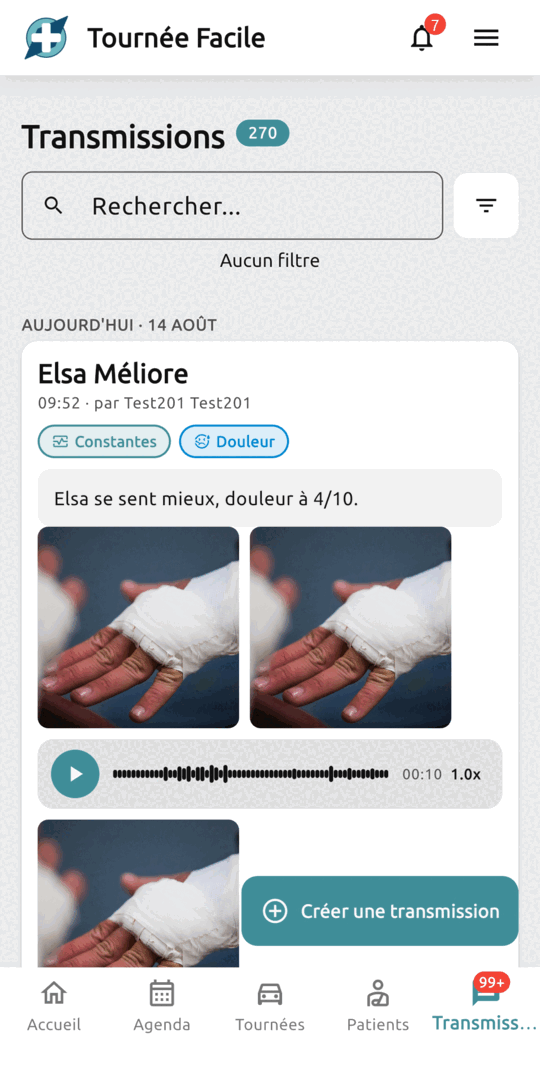
A well-planned round is worth nothing if what happened stays in the head of the nurse who did it. Every visit can produce a handover note: a clinical note attached to the patient, tagged — fall, pain, wound, needs a doctor — and visible to the whole practice.
And a handover note is not necessarily text. You photograph the wound — two shots three days apart say more about the healing than a paragraph ever will — and you dictate what you found instead of typing it: ten seconds of voice, and you are on your way. The note, the photos and the recording all land in the same place, on the same patient, on the same date.
Whoever takes the round the next day opens the patient’s record and immediately sees what happened, written by whom and at what time. Anything not yet read is flagged.
Five mistakes that make planning less effective
None of them is serious, and each takes two minutes to fix once spotted. If one of these sentences sounds familiar, that is where to look.
- “The software optimises nothing, it hands me back the order I already had.” You have probably made everything a fixed slot: with no room, there is nothing to search for. Move back to visiting windows everything that can be, and keep the fixed slot for the fasting blood draw and for Mr B. who leaves for work at 9.
- “I am always behind the times on screen.” The visit time is underestimated at a few patients’ — and after three days you stop looking at the schedule at all. Take the two or three where it always overruns and lengthen their time: the calculation follows what you actually spend, not what would be desirable.
- “The first arrival time is wrong, and everything after it too.” That is the start address. Do you leave from home three mornings out of five? Put your home address in — even if it means two different rounds depending on the day.
- “This patient always stays at the top, to be placed.” Their address is not usable, often because the street number or the building is missing. Open their record, complete it, run it again: settled once and for all.
- “I find out I am late once I am at the patient’s.” The labels were there the evening before. An orange label on a dressing with an imposed time is a phone call to make that evening: one minute the day before, against a morning that slips the day after.
None of this is a prerequisite: Tournée facile saves you time from your very first round. These five points are settings that get refined as you go, and the app is what flags them at the right moment — an orange label here, a visit left at the top of the list there. You fix them as they come up, and each round fits your day a little better.
How long it takes
The initial setup — patients, addresses, care, visit times, recurring appointments — takes one to two hours for a caseload of thirty. That is the only real effort, and it happens once.
After that, daily planning takes a few minutes: you open tomorrow’s round, run the optimisation, move up the patient who has to be seen first, and you are done.
Where the time is actually won:
- in the evening — no visiting order to redo in your head, no notepad to copy out;
- on the road — fewer kilometres every day, because the order is computed rather than guessed;
- on the doorstep — the phone number, the route, the care and the latest handover notes are on the same screen: no file to dig out, no contact to look up;
- when you hand over — a locum picks up a round that is already built, without an hour on the phone the evening before.
The mileage saving is real, but it is not the main thing. What you gain above all is no longer having to hold the round in your head.
Frequently asked questions
I plan in the evening on my computer and leave in the morning with my phone. Does that work?
Yes, and it is the most common way to use it. Tournée facile runs on iPhone, on Android and in a browser: same practice, same rounds, everything up to date from one device to the next. An internet connection is required — the app does not work offline.
I rearranged my round and I regret it. Can I go back?
Yes, as many times as you like. Every optimisation and every move by hand leaves a dated version in the round’s “Historique” (history): created, edited, optimised, rearranged by hand. You open the history, pick the version that suited you, restore it — and the order and times come back exactly as they were. So you can try another order without risking anything.
Do I have to give up my billing software?
No, keep it. Tournée facile plans your round, supports you through it, and gives you the month-end recap of your visits with an indicative coding for each. French SESAM-Vitale claim submission stays with your billing software.
There are several of us in the practice. Does it work for us?
That is exactly where the app earns its keep. Each round is assigned to one nurse, and everyone sees everyone else’s. You hand a round to a partner or a locum in two taps, without rebuilding anything: the route already computed is kept, and she arrives with every patient’s handover notes.
Where is my patients’ data hosted?
In France, with a certified health-data host (HDS). You remain the data controller for your records; we are only a processor, and we do not train any artificial intelligence on your data.
How many rounds can I create?
As many as you like — morning, afternoon, separate districts, cover. On the free plan, only automatic optimisation is limited, to three per week; rearranging a round by hand is never limited.
Want to try it before everyone else?
Join the nurses building the app with us and get exclusive early-adopter benefits.
Become a tester