
Visit report
Go back over your month, visit by visit
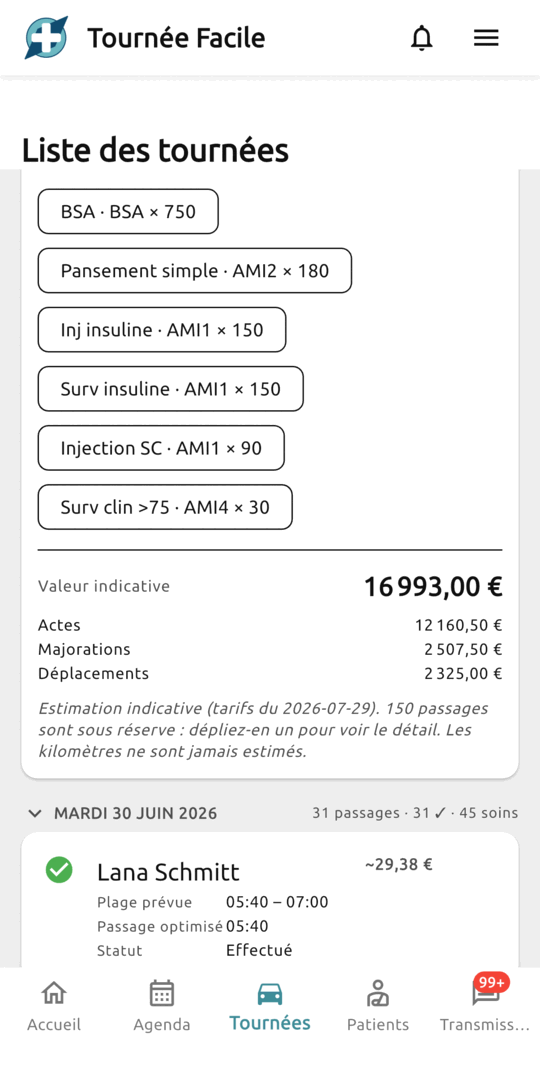
Last month, who did you see, and for what care? The answer fits on one screen: every day, every round, every visit, with the acts alongside.
Today, without Tournée facile
- On the 30th, you scroll back through the whole calendar to work out who was seen, and when.
- A visit nobody ticked looks, on paper, exactly like a visit that never happened.
- The week's acts are in your head or on a scrap of paper, to be dug up from memory.
With Tournée facile
- The month opens in one go, folded by day and by round: you unfold what you want to check.
- Visits nobody ticked are counted separately — exactly what you are looking for before invoicing.
- Every visit carries its acts, and the total is computed over the whole month.
What it actually changes
You see what happened, and what you're unsure about
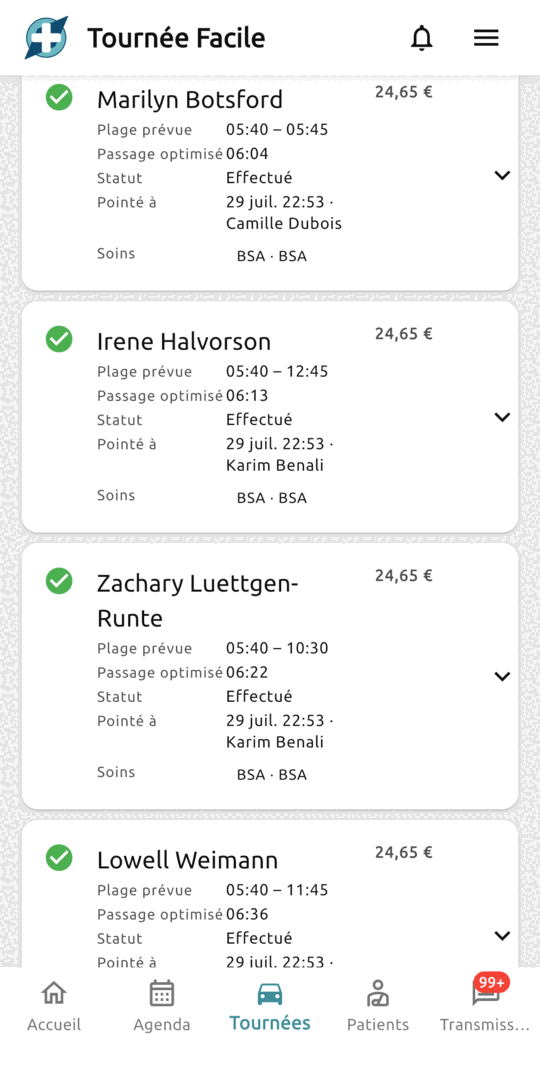
Done, skip, never ticked. The third matters as much as the other two: it is a planned visit nobody said anything about, and it is flagged rather than buried in the list.
A month that reads without getting lost
A day with two rounds reads one round at a time, and each round reads in the order you actually drove it — not the order the appointments were booked in.
Your coding, next to each visit
The acts you coded when planning the care show up on the visit, code and coefficient included. A visit done with no act at all shows in red: that is work at risk of never being invoiced.
An estimate, not an invoice
An indicative figure appears per visit and for the month, combinations and uplifts included where the app can work them out on its own. And where it cannot, it says so rather than rounding quietly.
How it works
Code it as you plan the care
When you create the care, pick its acts from the built-in list. It is the only extra data entry, and it takes seconds.
Tick as you leave
In play mode, a visit is marked done or skip with one gesture. The time and the name are recorded with it.
Read your month back
The screen opens on the current month. The arrows step back in time, the filters isolate a period, a state or a person.
A report is not proof of activity
This report shows what was entered in the app, not what happened at the patient's home: a visit carried out but never ticked does not appear as done. So it is not proof of activity, and the app invoices nothing — the figures are there to help you check, not to replace your software.
Frequently asked questions
No, and that is not planned. Invoicing requires an accreditation and a SESAM-Vitale chain we do not hold. The report is there so you can read your month back calmly before entering it into the accredited software you already use.
They apply the agreed tariffs, the rule for combining associated acts, and the uplifts that follow from context: single act, Sunday, night. They leave out mileage allowances, uplifts that depend on your clinical judgement, and caps. Every affected visit says so, and the date the tariffs were last checked appears under the total.
Yes. The arrows in the header step back month by month, and the filters let you set any period, or narrow to a single state or caregiver.
Also worth a look
Optimized rounds
The order of visits worked out for you, and a round that unfolds in front of you, stop after stop.
Learn moreShared calendar
Plan, assign and adjust the practice's appointments; everyone works on the same version.
Learn morePatient records
Contacts, care, observations and prescriptions for each patient, in one record that reads one-handed between two visits.
Learn moreWant to try it before everyone else?
Join the nurses building the app with us and get exclusive early-adopter benefits.
Become a tester